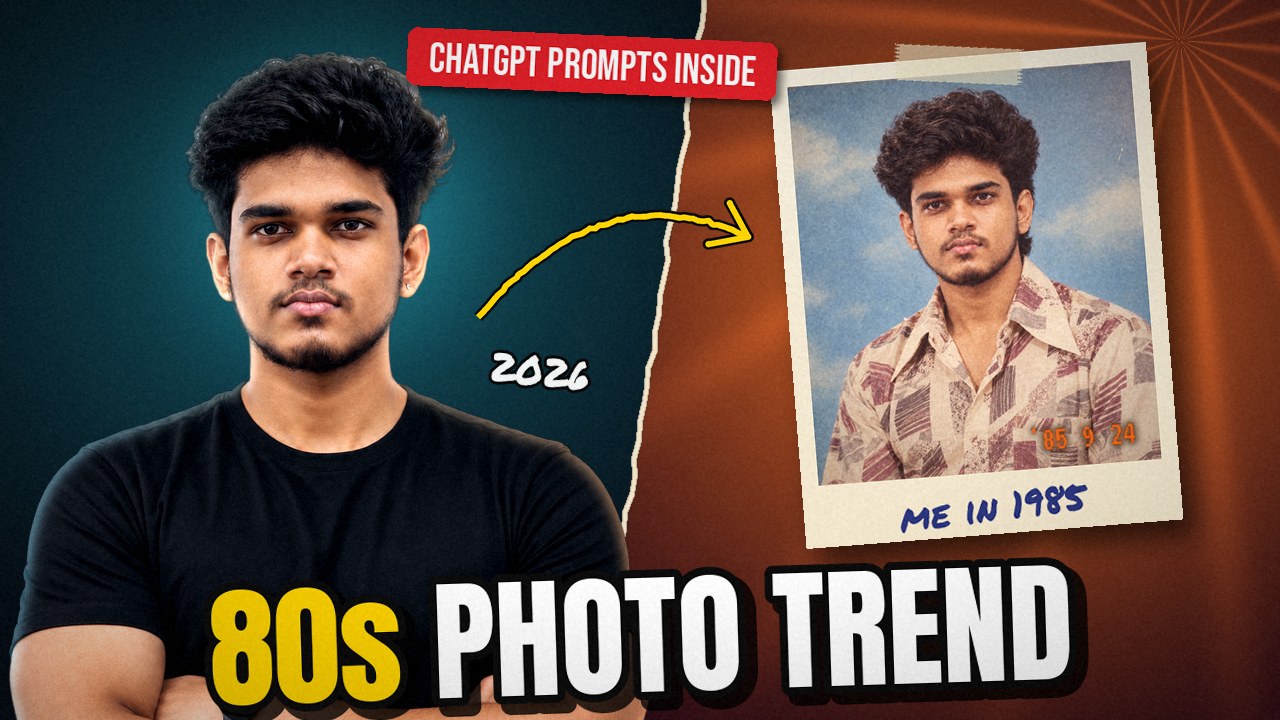
If your Instagram feed suddenly looks like somebody’s old family album, you’re not imagining it. Puffed-up hair, shoulder-pad blazers, chiffon sarees, grainy flash photos with that faded orange tint. Friends, cousins, even the uncle who never posts anything seem to have gone back to 1985.
This is the 80s photo trend, and most people are making it in ChatGPT. You upload a normal selfie, paste a few lines, and a minute later you have a picture that looks like it came out of a dusty album at your grandmother’s house. Below, we cover what it is, why it blew up, and how to make your own, with prompts you can copy.
Quick look
- What it is: an AI edit that makes a current photo look like it was shot in the 1980s
- Tools: ChatGPT (most popular) and Google Gemini
- Where it’s big: Instagram Reels, Stories and posts, plus X
- Cost: free to try, with daily limits
What Is the 80s Photo Trend?
The idea is simple. You take a recent photo and ask an AI image tool to recreate it as if it had been clicked in the 1980s. Your face stays the same. Almost everything else changes: hair, clothes, jewellery, background, lighting and even the texture of the photo.
That’s what separates it from the vintage filters we’ve had for years. A filter adds grain on top of your picture, so you’re still in your 2026 hoodie in front of your 2026 wall. Here, the AI rebuilds the whole scene. You might end up in a studio with a painted backdrop, in a silk saree with jasmine in your hair, or next to an Ambassador car on a street full of hand-painted cinema posters.
Many Indian users go for an old Bollywood look, but since you write the prompt yourself, you can just as easily ask for an 80s Tamil or Telugu cinema feel.
Why Is the 80s Photo Trend Going Viral?
The ChatGPT 80s trend took off in the second week of September 2026. By September 9 and 10, Business Today and India TV were already running explainers on it. A few things pushed it along.
It’s nostalgia you can actually see
Almost every Indian family has an album from that decade in a cupboard somewhere. Seeing yourself in the same kind of frame your parents once posed in is oddly emotional, and it’s exactly the sort of picture that ends up in the family WhatsApp group.
Two minutes, zero editing skill
No Photoshop, no sliders. One photo, one prompt, done. That’s why even people who never post AI edits are joining in.
Before-and-after posts do really well
Slide one: you today. Slide two: you in 1986. People stop scrolling to compare, and that engagement pushes the post into more feeds.
The “Add Yours” sticker keeps it going
On Instagram Stories, people share their result with the Add Yours sticker, often with the prompt, and tag friends to try it. Every new story pulls in a few more people.
We were already warmed up
Last year gave us the Ghibli-style wave and then Gemini’s Nano Banana edits with 3D figurines and vintage sarees. People already know the drill, so this one didn’t need a tutorial.
Where Is It Trending, and How Big Is It?
Instagram is the main home of the 80s photo trend: Reels with quick before-and-after transitions, Stories through the Add Yours chain, and regular carousel posts. It has spread on X too, where people swap prompts in the replies.
India and Pakistan have given it their own flavour. Instead of neon and leg warmers, a lot of South Asian results lean into old Bollywood styling, which seems to be one reason it has lasted longer here. Elsewhere, the popular versions look more like American mall studio portraits and school yearbook photos.
On numbers, be careful with sites quoting huge view counts. We haven’t seen any official figure from Instagram or OpenAI. What’s clear is that hashtags like #80sPhotoTrend and #ChatGPT80s are packed, and several tech sites rank it among the fastest-spreading AI photo trends of 2026.
ChatGPT or Gemini: Where Should You Make It?
You can try the 80s photo trend in either app. ChatGPT is what most people use, but Gemini makes a good backup.
| ChatGPT | Google Gemini | |
|---|---|---|
| Where | chatgpt.com or the app | gemini.google.com or the app |
| How to start | Tap +, upload your photo, paste the prompt | Choose “Create images” in the tools menu, upload, paste |
| Free? | Yes, with a daily image limit | Yes, with a daily limit |
| Good at | Quick back-and-forth changes | Keeping faces consistent (Nano Banana model) |
| Watermark | No visible watermark | Small visible mark plus hidden SynthID tag |
Start with ChatGPT. If the face keeps drifting, try the same prompt in Gemini.
How to Make Your 80s Photo in ChatGPT
- Pick the right photo. This matters more than the prompt. Use a clear, front-facing photo in good light, with nothing covering your face. Avoid beauty-filtered pictures, because the AI copies that plastic skin. Go solo for your first try.
- Open ChatGPT. Use the app or chatgpt.com. A free account is enough. Tap + and upload your photo.
- Paste a detailed prompt. Typing “make me look 80s” usually gives you a fancy-dress version of yourself. Say what to keep, what to change and what kind of photo you want. Use one of the prompts below.
- Check the face. Zoom in on the eyes, nose and smile. If it looks more like your cousin than you, don’t start over. Fix it with a follow-up message.
- Fine-tune in the same chat. Ask for more grain, another outfit or a new background. ChatGPT keeps your photo in the chat, so small changes are quick.
- Download and post. Share it as a before-and-after carousel or Reel. A 4:5 size suits the Instagram feed. Add the Add Yours sticker in Stories if you want friends to join, and mention it’s an AI edit.
6 Copy-Paste Prompts for the 80s Photo Trend
Each prompt starts with a line asking the tool to preserve your face. Keep that part and change the rest. Words in [square brackets] are options you can swap. Before sharing, compare the result with your original photo: check facial features, hands and jewellery. Asking the tool to preserve your face helps guide the edit, but it does not guarantee an exact match.
1. Classic 80s Studio Portrait
Best for: your first try
Use my uploaded photo as the face reference. Keep my face, skin tone, age and features exactly the same. Recreate me as a 1980s Indian studio portrait: faded sky-blue painted backdrop, a period hairstyle with volume, [a wide-collar printed shirt / a chiffon saree], warm studio lighting, light film grain and slightly faded colours. It should look like a real print from 1985, not a modern photo with a filter.
2. 80s Movie Still
Best for: a dramatic, filmy post
Use my uploaded photo as the face reference and keep my features exactly the same. Turn this into a still from a 1980s [Tamil / Telugu / Hindi] film: a lead actor’s costume from that era, big hair, a colourful painted film set, dramatic lighting, rich warm colours and the grain of an old 35mm print. No text or logos.
3. Family Album Photo
Best for: group photos
Keep every person’s face, age and skin tone exactly as in this photo. Recreate us as a 1980s Indian family photo at home: cotton sarees and printed shirts, simple gold jewellery, a wooden sofa, a wall calendar and a steel almirah behind us. Direct camera flash, warm faded colours and the yellowed look of an old album print.
4. Retro Couple Portrait
Best for: couples and anniversaries
Use both faces from my photo exactly as they are. Recreate us as a young couple in a 1980s studio photo: [her in a silk saree with jasmine flowers, him in a wide-collar shirt and flared trousers], standing close in a slightly formal pose. Painted garden backdrop, warm studio lights, soft film grain and faded colours.
5. Disco Night
Best for: party posts and Reels
Keep my face and features unchanged. Place me on a 1980s disco floor: sequinned outfit, big hair, pink and blue lights, a mirror ball and a little smoke in the air. Shot on film with direct flash, strong colours and visible grain.
6. Old Snapshot with Date Stamp
Best for: a photo that looks like it was found in an album
Keep my face exactly the same. Make this a casual 1980s snapshot from a point-and-shoot film camera, with an orange date stamp reading ’86 5 12 in the bottom right corner. Slightly off-centre framing, direct flash, faded colours, soft focus and a thin white border like a lab print.
Result not right? Send one of these in the same chat:
- Face doesn’t match: “This doesn’t look like me. Keep everything else, but match the face exactly to my original photo.”
- Too clean or plastic: “Make it look like a real old photo, with more grain, softer focus and natural skin texture.”
- Modern objects crept in: “Remove the [phone / watch] and replace it with something from the 1980s.”
- Wrong size: “Same image, but in a 4:5 portrait size.”
A Few Sensible Precautions
The 80s photo trend is harmless fun, but you are handing a clear photo of your face to an AI company, so give it thirty seconds of thought.
- Use your own photos, or ones where everyone in the picture has agreed.
- Think twice about children’s photos. Once a picture is out there, you don’t fully control where it goes.
- Check your data settings. In ChatGPT, go to Settings, then Data Controls, and turn off “Improve the model for everyone” if you don’t want your chats used for training.
- Don’t pass it off as real. A quick “AI edit” in the caption keeps things honest, especially with older relatives.
Worried your pictures are already being misused? Our guide on how to check if someone is using your photo online walks you through it.
Frequently Asked Questions
Is the 80s photo trend free?
Yes. ChatGPT and Gemini both let you try it on a free account, with a daily image limit. Hit the limit and you’ll have to wait or upgrade.
Why doesn’t my 80s photo look like me?
Usually it’s the input photo: too dark, too small, a side angle or heavily filtered. Use a clearer picture, keep the face-lock line at the start of the prompt, and try the fix above.
Can I write the prompt in Tamil?
Yes, ChatGPT understands Tamil. English tends to give more predictable results for detailed styling, which is why the prompts above are in English, but mixing both works.
Does it work with a whole family photo?
Yes, use prompt 3. Group shots are harder, so faces can shift a little. A well-lit photo with everyone facing the camera helps.
So, Who Shows Up in 1985?
Joining the 80s photo trend takes one decent photo and one prompt, so pick yours and see who turns up. If the first try looks like a stranger, one follow-up message usually sorts it out. And if you get one you love, show your parents before you post it. Their reaction is half the fun.