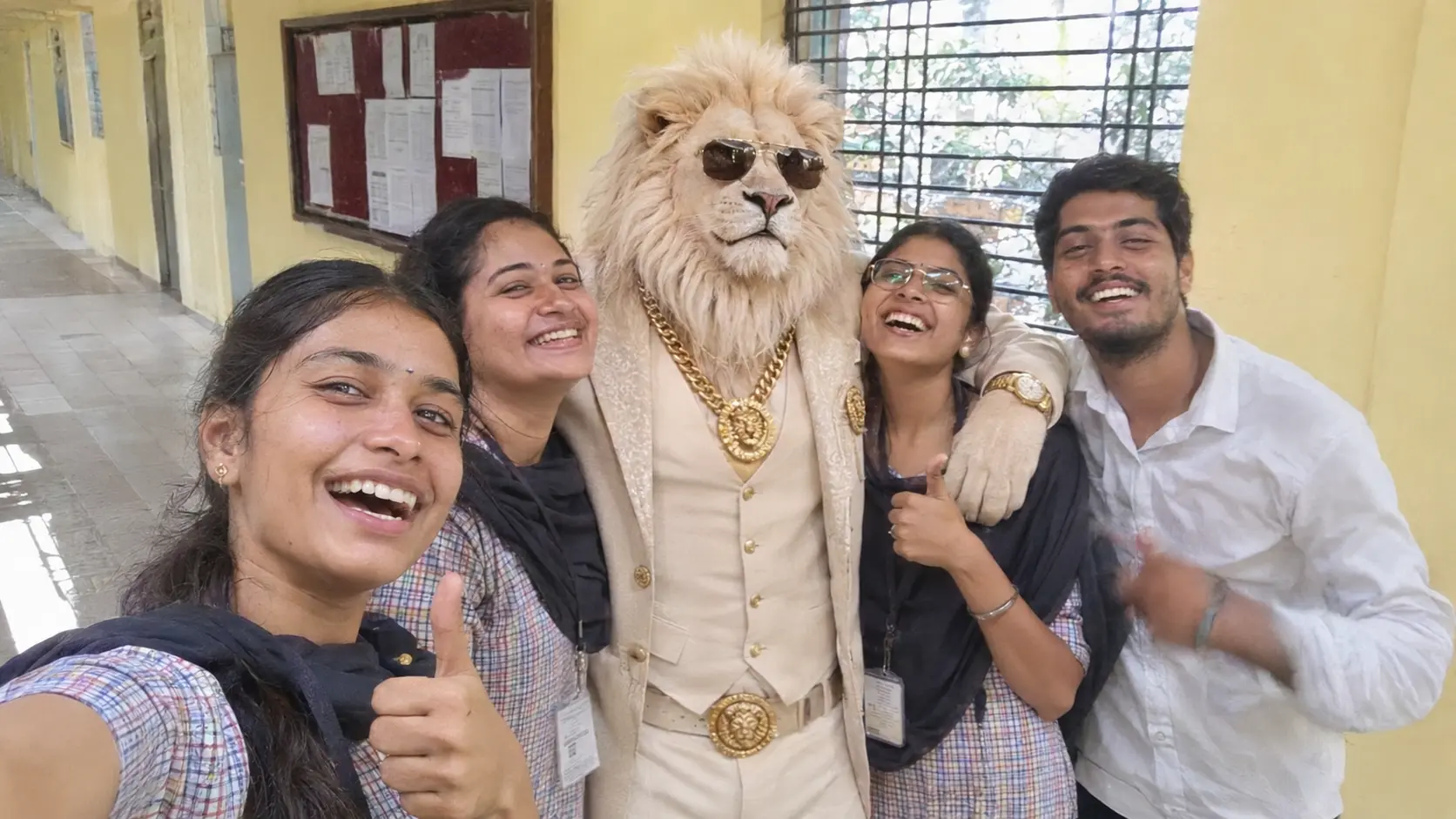
Open Instagram this week and you will meet him within ten swipes. A lion. White suit, a gold chain thick enough to anchor a boat, dark sunglasses, and a face that says the auction is already over. His name is Sheru Bhai, and the Sheru Bhai AI photo is now in every second story, with somebody’s cousin standing next to him like they go way back.
A Sheru Bhai AI photo takes about a minute to make. You upload a selfie to Gemini or ChatGPT, paste one prompt, and the lion walks into your picture. No separate app, no watermark across the face, and the free tier of either tool is enough for a couple of tries. Live Hindustan carried the prompt on 12 November, and it has been doing the rounds of WhatsApp groups ever since.
Quick look
- Trend: Sheru Bhai AI photo (a lion in a white suit and gold chain, standing with you)
- Tools: Google Gemini or ChatGPT, free plan works
- Time: under two minutes per photo
- What you need: one clear selfie, face fully visible
In this guide
- Who is Sheru Bhai, anyway?
- What a proper Sheru Bhai AI photo needs
- Gemini or ChatGPT: the four-tap method
- The one Sheru Bhai AI photo prompt that does the job
- Three more ways to shoot it
- When the lion comes out wrong
- Before you post your Sheru Bhai AI photo
- More guides on FZOOK
Who is Sheru Bhai, anyway?
Not a real lion, and not a real person either. Sheru Bhai is a made-up character from the AI reels that took over Hindi Instagram in October. A lion’s head on a man’s body, usually bidding crores at an auction or stepping out of a car that costs more than a flat. Sher means lion, bhai means brother. Brother Lion, basically the rich uncle of the internet.
The videos came first. Short clips of Sheru outbidding a wolf for a yacht, or buying a flying car and then asking where the road to the sky is. The joke is always the same: the calmest man in the room, who happens to be a lion, wins without raising his voice.
Then people noticed something useful. He looks identical in every clip. Same suit, same chain, same glasses. That consistency is exactly what makes him easy to drop into a still photo, and by early November the Sheru Bhai AI photo had overtaken the video version. A photo needs one prompt and a free tool. A video needs a paid tool and a lot of patience.
What a proper Sheru Bhai AI photo needs
Most failed attempts fail because the prompt was vague. Sheru Bhai has a uniform, and the tool needs every piece of it spelled out before it can give you a convincing Sheru Bhai AI photo.
| Part | What to ask for |
|---|---|
| Head | White lion, thick cream-coloured mane, calm expression, looking at the camera |
| Eyes | Black sunglasses, aviator style |
| Suit | White three-piece suit, white shirt, sometimes a grey waistcoat |
| Gold | Heavy chain, wristwatch, rings, pocket square |
| Pose | Standing upright like a person, one hand in pocket or resting on your shoulder |
| Setting | Marble hall, luxury car, hotel lobby, or whatever was behind you in the original selfie |
Skip the sunglasses and the gold and you get a generic lion man. Those two details are what make people recognise a Sheru Bhai AI photo in half a second, which is the whole point of posting it.
Gemini or ChatGPT: the four-tap method
Both work. I tried the same selfie in both on a Friday evening and here is the honest difference. Gemini keeps your face closer to the original and is quicker on a phone. ChatGPT gets the suit fabric and the lighting a little richer, but it sometimes smooths your face more than you would like. If you only want one attempt at a Sheru Bhai AI photo, start with Gemini.
On Gemini
- Open the Gemini app or gemini.google.com and sign in with your Google account.
- Tap the plus icon and upload your selfie. A front-facing shot with decent light is enough; a group photo is not.
- Paste the prompt from the next section and send it.
- Wait twenty to forty seconds, then download the image from the three-dot menu.
On ChatGPT
- Start a new chat and attach the selfie with the paperclip icon.
- Type “Create an image:” and paste the prompt right after it. Without those two words, ChatGPT sometimes describes the picture instead of making it.
- Send, wait for the preview to sharpen, then tap download.
- On the free plan you get a few images a day, so get the prompt right before you spend them.
One thing people miss on both: pick a selfie where your hands are visible or fully out of frame. Half-hidden hands are where extra fingers come from.
The one Sheru Bhai AI photo prompt that does the job
This is the version I kept coming back to. It tells the tool what to leave alone (your face) before it tells it what to add (the lion), and that order matters more than any fancy word.
Prompt 1: Standing with Sheru Bhai
Use the uploaded photo as the only reference for my face, body, skin tone and clothes. Keep my face exactly as it is, with no retouching. Add a tall anthropomorphic white lion standing beside me, with a thick cream-white mane, a calm royal expression and black aviator sunglasses. He wears a tailored white three-piece suit, a white shirt, a heavy gold chain, a gold wristwatch and a gold pocket square. His paw rests on my shoulder. Replace the background with a marble palace hall lit by warm golden light. Full-body shot, realistic DSLR photo, sharp focus on both of us, vertical 9:16 frame.
Swap the last two lines freely. “Outside a black luxury car at night” or “in a five-star hotel lobby” both come out well. Keep the first sentence as it is; that line is what saves your face from changing.
Three more ways to shoot it
The standing-beside-him version is the classic Sheru Bhai AI photo, but it is also the one everybody has already seen. These three get more reactions.
Prompt 2: You become Sheru Bhai
This one gets the most comments, because nobody expects your own body under the lion’s head.
Use the uploaded photo as the reference for my body, height, skin tone and pose. Replace only my head with a realistic white lion’s head that has a thick cream mane and black aviator sunglasses. Dress me in a white three-piece suit, white shirt, heavy gold chain, gold watch and gold rings. Keep the rest of the photo and the background exactly as they are. Natural lighting, photorealistic, no cartoon look.
Prompt 3: Sheru at your own spot
The palace background is everywhere now. A Sheru Bhai AI photo taken outside a tea shop in Vellore gets a far better reaction than one more marble hall.
Keep the uploaded photo exactly as it is, including my face, clothes and the full background. Add a tall white lion in a white suit, black sunglasses and a heavy gold chain standing next to me, as if he was there when the photo was taken. Match the lighting, shadows and camera angle of the original photo so he blends in naturally.
Prompt 4: The whole gang
Works with two or three people in the frame. More than that and faces start drifting.
Use the uploaded photo as the only reference for every person in it. Keep all faces, clothes and positions unchanged. Add a tall anthropomorphic white lion in a white three-piece suit, black sunglasses, heavy gold chain and gold watch standing in the centre of the group with his arms around the people beside him. Replace the background with a luxury hotel entrance at night with warm lights. Realistic group photo, everyone in sharp focus.
When the lion comes out wrong
It will, at least once. Do not start a new chat. Reply in the same conversation with one of these lines and the tool fixes only that part of your Sheru Bhai AI photo.
| What you got | What to say |
|---|---|
| Your face looks like a different person | Keep my face identical to the uploaded photo. Do not change my features, skin tone or hairstyle. |
| The lion looks like a man in a mask | Make the lion’s fur, eyes and muzzle photorealistic, not a costume or a cartoon. |
| Chain is thin or missing | Make the gold chain thick and clearly visible, Cuban-link style, resting on the suit. |
| Extra paws or fingers | The lion has exactly two arms. I have exactly two hands with five fingers each. |
| Scene is too dark | Brighten the whole image with warm, even daylight. Keep everything else the same. |
| Lion is tiny or far away | Make the lion taller than me and standing right beside me, shoulder to shoulder. |
Two fixes in one message is fine. Five is not; the tool starts changing things you did not ask about.
Before you post your Sheru Bhai AI photo
A few things worth thirty seconds of thought, because the photo will outlive the trend.
Upload your own photo, not your friend’s. Adding someone to a lion picture without asking is funny for a day and awkward for a month. If you want the group version, get everyone in on it first.
Skip real brand names and real celebrities in the prompt. A lion in a suit is harmless; a lion in a suit holding a named watch next to a named actor is the kind of post that gets reported. Keep the logos generic and the people fictional.
Remember where the photo lives. Both Gemini and ChatGPT keep uploaded images according to their own policies, and Gemini quietly marks its output so it can be identified as AI-made. That is fine for a reel. A Sheru Bhai AI photo is not fine as a profile picture on a job portal or a government site, so keep Sheru on Instagram where he belongs.
And once your lion photo is out there, it can be copied like any other. If you ever suspect someone is reusing it, here is how to check where your photo is showing up online.
So, who is standing next to the lion?
That is the whole Sheru Bhai AI photo trend. One selfie, one prompt, one very calm lion in a white suit. Make it tonight, post it before the feed moves on to the next animal, and tag the friend who still thinks Sheru Bhai is a real person.
More guides on FZOOK
- 80s Photo Trend: 6 ChatGPT prompts for the retro studio look that came just before this one
- Ayudha Pooja photo prompt if you want the festive version of a one-prompt portrait
- AI prompt generator apps for writing your own prompts when the next trend lands
- Instagram chat wallpaper with your own photo to put your new Sheru Bhai AI photo somewhere people will see it daily