You type a bank OTP for your brother, hit send, and it sits in the chat forever, scrolling past every time someone searches that conversation. For four years WhatsApp let photos, videos and voice notes vanish after one look, but plain text never got the same treatment. That changed on 12 November. A WhatsApp view once text now exists, and the first Android beta testers are already sending messages that can be read exactly one time and never again.
This guide covers what the WhatsApp view once text does, the five taps to send one, what the receiver sees on their side, what WhatsApp blocks while the message is open, the one thing it still cannot stop, and who gets the feature first. There is also an honest list of what nobody knows yet, because this is a beta and a few questions have no answer right now.
| Quick facts | |
|---|---|
| Feature | WhatsApp view once text messages |
| Spotted on | 12 November 2026 |
| Version | WhatsApp beta for Android 2.26.45.6 (Google Play) |
| Who has it | Some beta testers, more over the coming weeks |
| Stable release | No date announced |
| iPhone | Not live yet |
In this guide
- What a WhatsApp view once text actually does
- How to send a WhatsApp view once text in 5 easy steps
- What the other person sees
- What gets blocked, and the one thing that does not
- View once text vs disappearing messages vs delete for everyone
- Who gets it first: beta, stable and iPhone
- Good uses, bad uses
- Six things nobody knows yet
- More guides on FZOOK
What a WhatsApp view once text actually does
The idea is borrowed from the view once photos WhatsApp added in 2021 and the view once voice notes that followed in 2023. You send something, the other person opens it one time, and it is gone from both phones. Text was the odd one out. A password, a card PIN, an address you did not want lying around: all of it stayed in the chat until somebody deleted it by hand.
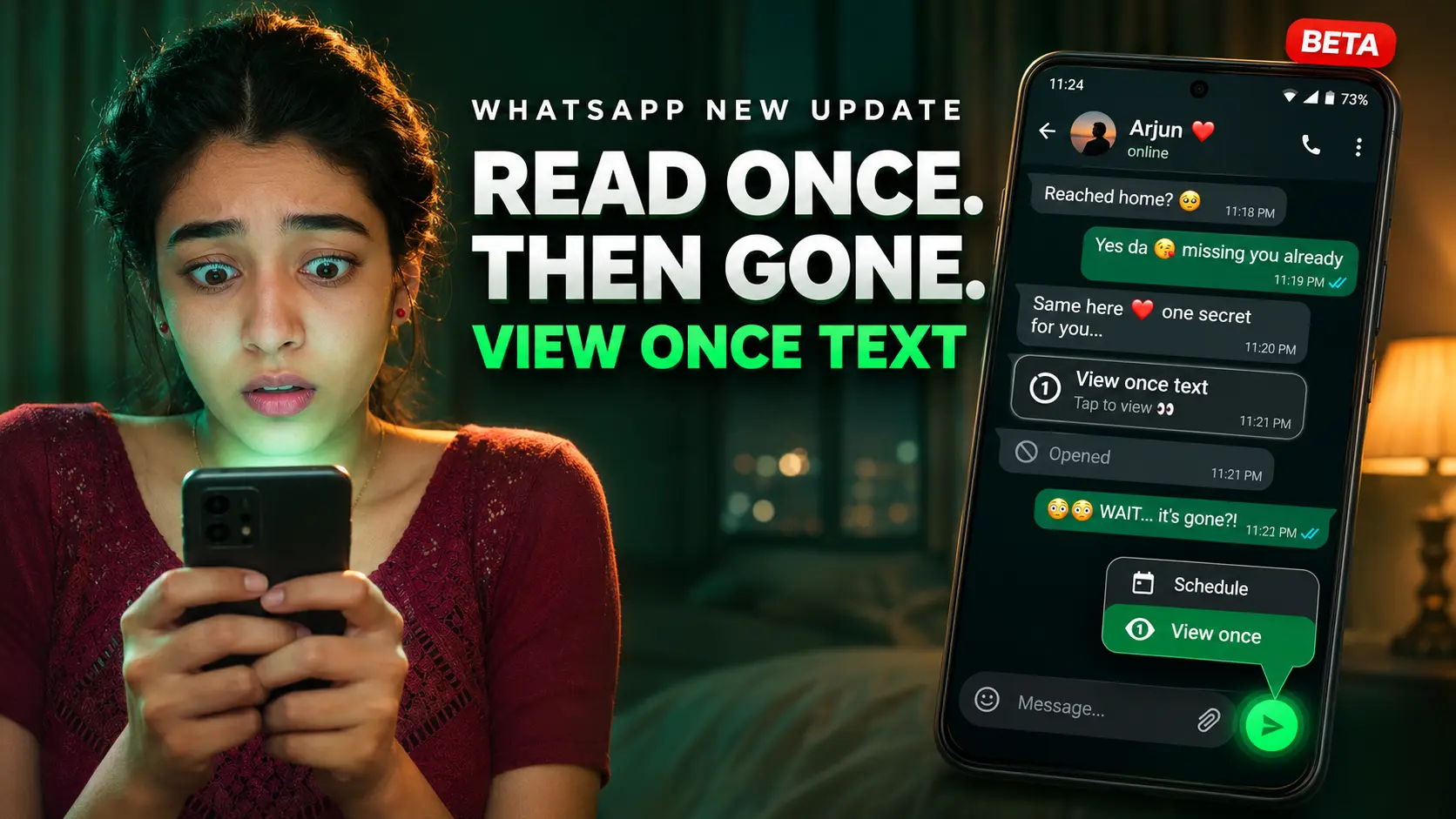
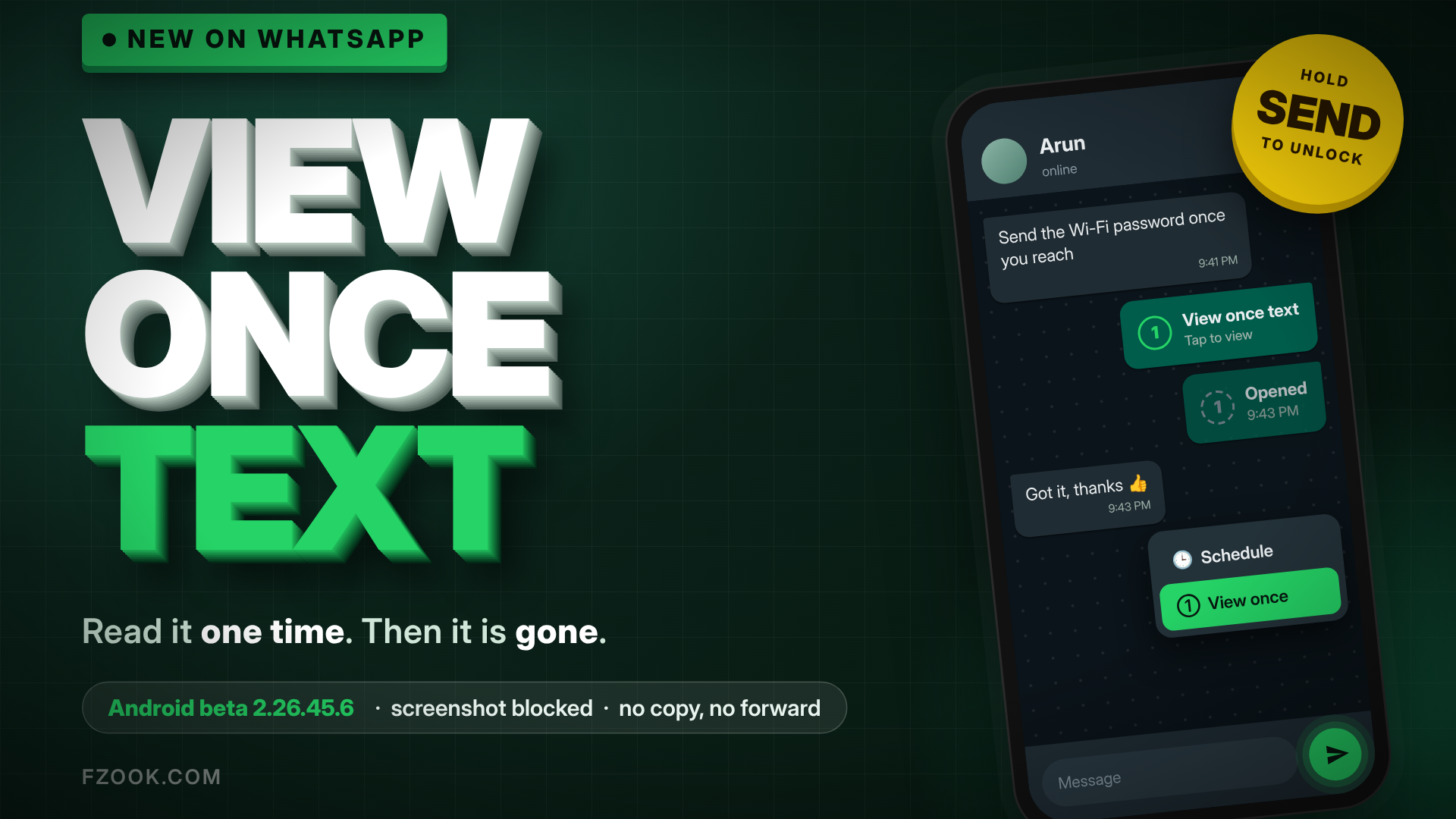
A WhatsApp view once text closes that gap. The message does not even appear as readable text in the chat. It lands as a locked bubble, the receiver taps it, it opens on its own screen, and the moment they close that screen it is finished. The chat then shows a small “opened” mark where the message used to be, and that is all either side ever sees again.
Worth saying clearly: this is not the same as disappearing messages. Disappearing messages run a timer on an entire chat. A view once text is one message, chosen at the moment you send it, in an otherwise normal conversation. You can mix the two in the same chat without changing any setting.
How to send a WhatsApp view once text in 5 easy steps
There is no new icon in the chat bar and no toggle in settings. The whole thing lives behind the send button, which is why most people with the beta have not noticed it yet.
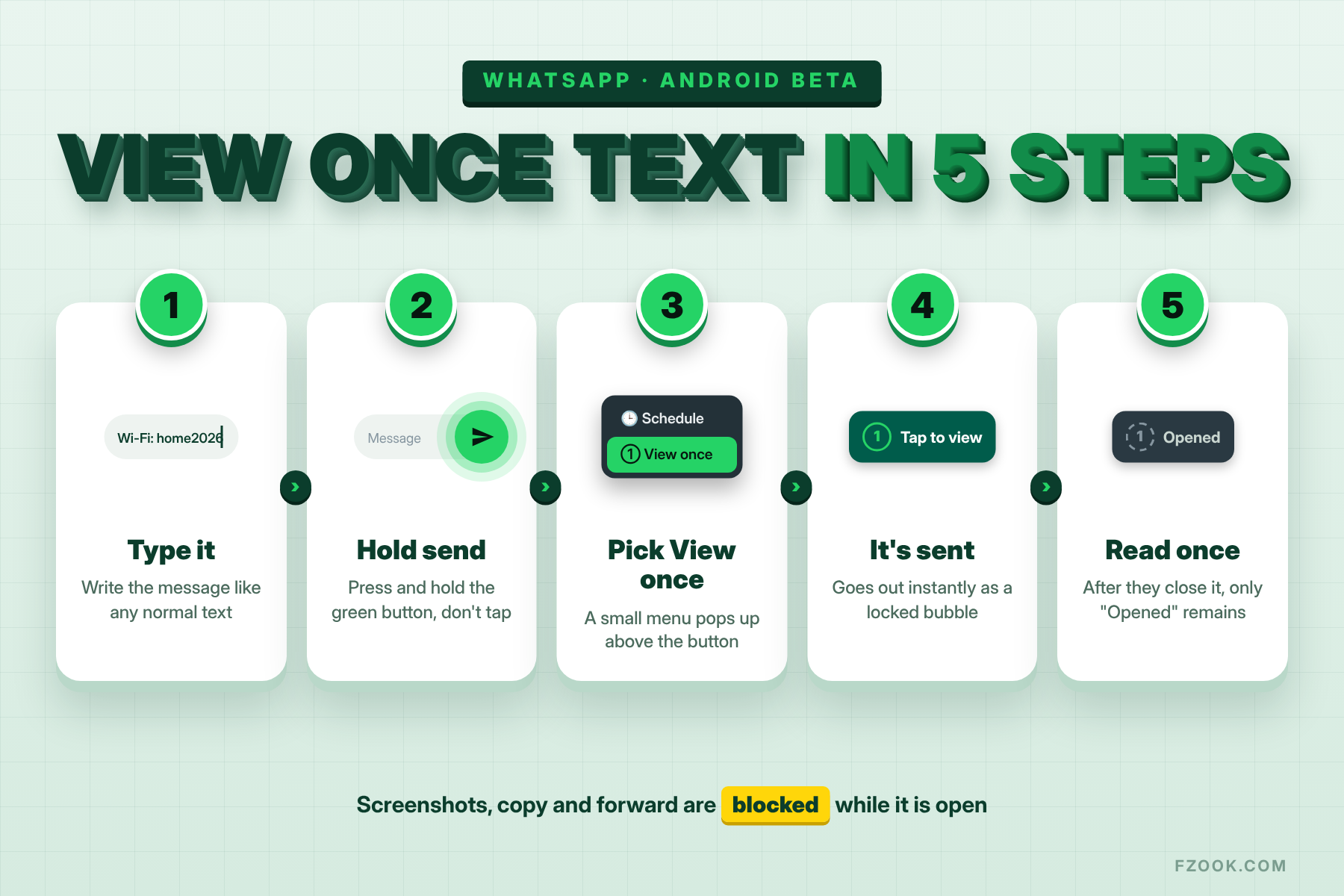
- Open any individual chat and type your message as usual.
- Instead of tapping the green send button, press and hold it.
- A small menu pops up above the button. On current beta builds it shows two choices: schedule the message, or send it as View once.
- Tap View once. The message goes out immediately; there is no second confirmation.
- Look at the bubble in your own chat. It shows as a view once item rather than readable text, so you know it went out the right way.
The first time a chat opens on a phone that has the feature, WhatsApp shows a short tip at the bottom of the screen explaining the press-and-hold step. If you have never seen that tip, your account has not received the rollout yet, even if your app version matches.
One limit that trips people up: the same long-press menu offers scheduled messages, but you cannot combine the two. A WhatsApp view once text goes now or not at all. Whether that changes before the stable release is anyone’s guess.
What the other person sees
On the receiving phone, a WhatsApp view once text arrives as a bubble that says it can be viewed once, with no preview of the actual words. The notification does not show the text either, so a glance at the lock screen reveals nothing.
Tapping the bubble opens the message on a separate full screen, away from the rest of the chat. The receiver can read it for as long as they keep that screen open. Close it, go back, and the bubble is replaced with an opened marker. Tapping that marker does nothing.
If read receipts are on for both people, the sender gets the usual blue ticks plus the opened state, so you know not just that it was delivered but that it was actually read. If either side has turned read receipts off, you will see that the message was delivered but not whether it was opened, which is the same rule view once photos have always followed.
What gets blocked, and the one thing that does not
This is where a WhatsApp view once text is stricter than the photo version ever was. While the message is open on screen, WhatsApp switches off almost every way of keeping it.
| Action | While a view once text is open |
|---|---|
| Screenshot | Blocked; the capture comes out black |
| Screen recording | Blocked on the same screen |
| Copy the text | Not available |
| Forward | Not available |
| Star or save | Not available |
| Long-press menu | Does not appear at all |
| Read it a second time | Not possible once the screen is closed |
| Photograph the screen with another phone | Still possible; nothing in the app can stop it |
That last row is the honest part. WhatsApp has said the same thing about view once photos since day one: a second camera pointed at the screen beats every software block. A WhatsApp view once text keeps your words out of chat history, search results, backups and forwarded screenshots. It does not make the person on the other end trustworthy. Send it to people you would trust with the information anyway, just without the paper trail.
View once text vs disappearing messages vs delete for everyone
WhatsApp now has three different ways to make a message go away, and the WhatsApp view once text is the newest, and they are easy to mix up. Here is how they sit next to each other.
| View once text | Disappearing messages | Delete for everyone | |
|---|---|---|---|
| Applies to | One message you choose | Every message in the chat | One message, after sending |
| When it goes | After one read | 24 hours, 7 days or 90 days | Whenever you delete it |
| Receiver can read it | Once, on a separate screen | Normally, until the timer ends | Only if they saw it before you deleted |
| Screenshot blocked | Yes | No | No |
| Copy and forward blocked | Yes | No | No, until deleted |
| Leaves a trace | An “opened” mark | Nothing after expiry | “This message was deleted” |
| Available today | Android beta only | Everyone | Everyone |
In practice, disappearing messages suit a chat where nothing needs to be kept, like a trip planning group. Delete for everyone is the panic button. A WhatsApp view once text is the one you reach for when a single line, an OTP, a Wi-Fi password, a locker code, should be read and then forgotten.
Who gets it first: beta, stable and iPhone
Right now the feature is only on WhatsApp beta for Android, version 2.26.45.6 from Google Play, and only for a slice of testers on that version. Being on the right build is not enough; WhatsApp switches it on account by account. The build I am running is a newer beta than 2.26.45.6, and the long-press menu still shows nothing but schedule. That is normal for these rollouts, which usually take a few weeks to reach everyone in the beta.
If you want to be in the queue, the only official route is the Play Store beta programme. Open the WhatsApp listing in the Play Store, scroll to “Join the beta”, tap it, and wait for the next update. The programme is often full, in which case the button does not appear at all; checking back every few days is the only fix. Avoid APK files from random sites for this; a chat app that holds your OTPs is the last thing to sideload.
For the stable app, WhatsApp has not given a date. Features that reach this stage in beta have usually landed in the public app within one to three months, but that is a pattern, not a promise. iPhone users are further back: a matching feature has been seen in iOS beta code earlier this year, but nothing is live. WhatsApp Web and the desktop app have not been mentioned at all.
Good uses, bad uses
A feature like this invites misuse as much as use, so here is a short, practical split.
Good uses: a one-time code someone needs in the next two minutes, a Wi-Fi or door-lock password for a guest, a card number you are reading out for one payment, a home address sent to a delivery person, a reply to a question you would rather not have in a searchable chat.
Bad uses: anything the other person might need again. A meeting time, an account number for a monthly transfer, a doctor’s instructions. If they will have to ask you to resend it, it should have been a normal message. And never use it for something you would be unhappy to see photographed, because that door stays open.
There is a quieter benefit too. A WhatsApp view once text never ends up in a chat export or in the kind of screenshot that travels through family groups. If you have ever had to check where a photo of yours ended up online, you already know why that matters.
Six things nobody knows yet
Beta features arrive half-finished, and the write-ups so far answer the easy questions and skip the hard ones. These are still open.
- Expiry if never opened. View once photos delete themselves after 14 days if the receiver never taps them. Nobody has confirmed the same timer for text.
- Group chats. Every report so far describes one-to-one chats. Whether each member of a group gets their own single view, as with photos, has not been tested.
- Backups. A view once text that was never opened might or might not sit inside a chat backup. There is no answer yet.
- Linked devices. If the receiver has WhatsApp Web open, it is unclear whether the message shows there, and whether the screenshot block holds on a computer.
- Business accounts. No word on whether a business number can send or receive one.
- Edit and delete. Delete for everyone presumably still works on an unopened view once text, but no one has shown it.
This post will be updated as those get answered. If you are on the beta and have the feature, the comments are open; a screenshot of the long-press menu alone would settle a few of these.
One tap to read, no way back
The WhatsApp view once text is a small feature with a very specific job: let one line of text be read and then cease to exist. It does that well, it blocks the obvious ways of keeping a copy, and it is upfront about the one way it cannot block. If you are on the Android beta, press and hold the send button today and see whether the option is there. If you are not, it will come to the regular app soon enough, and now you know exactly where to look.
More guides on FZOOK
- WhatsApp new features 2026 for the other updates that arrived alongside this one
- Instagram location search if you want to see who tagged a place now that the Places tab is gone
- Instagram chat wallpaper with your own photo for a quick DM makeover
- Photo actions for Android for shortcuts that save a few taps every day
Sources: WABetaInfo’s report on the 2.26.45.6 beta and WhatsApp’s original view once announcement.